
See which Amazon ads actually make you money
Amazon Ads 1-Click Pro turns your Sponsored Products reports and your Seller Republic listings into a profit report for every product you advertise: what the ads earned, what sold on its own, and what to do about it. After product cost, Amazon fees, VAT and ad spend.
Upload your files, click Build report once, and it is done. It never connects to your Amazon account.
Then $10 a month at the launch price, usual $50. No credit card for the trial, no contract, cancel any time.
Same ROAS. Opposite result.
Two campaigns that look identical in Campaign Manager. Example figures.
| Campaign A | Campaign B | |
|---|---|---|
| Ad sales | £320.00 | £320.00 |
| Ad spend | £100.00 | £100.00 |
| ROAS | 3.20 | 3.20 |
| ACoS | 31.3% | 31.3% |
| Profit after cost, fees and VAT | £144.00 | £80.00 |
| Break-even ROAS | 2.22 | 4.00 |
| Ads profit | +£44.00 | −£20.00 |
| What to do | Scale it | Pull the bid back |
The first four rows are all Campaign Manager shows you. The last four are what Amazon Ads 1-Click Pro adds.
ROAS and ACoS show what an ad sold. Not what it earned.
Campaign Manager knows your spend and your sales. It does not know what the product cost you, what Amazon took in referral and FBA fees, or how much of the price was VAT. So two campaigns with the same ROAS can do opposite things to your bank balance.
It also cannot show you how a product does without the ad. A campaign can look healthy while your organic sales quietly cover its losses. TACoS gets closer, but it is still a share of revenue, not a profit figure.
- Profit in money, not a ratio. Your true profit on every advertised product, costed with your own numbers: product cost, referral fee, FBA fee, closing and other fees, VAT, and the ad spend itself.
- Ads and organic, separated. Units that came through an ad are counted apart from units that sold with no ad click. Ads profit plus organic profit equals net, on every row and every total.
- A break-even line for every product. Break-even ROAS is worked out from each product’s own margin, so you can see how much bid headroom is left, or how far under water a campaign is.
Your Seller Republic account already holds the hard part
Profit needs a cost to subtract. Your Seller Republic listings already record product cost, Amazon fees, price, stock and 7, 30, 60 and 90-day sales for every SKU. Amazon Ads 1-Click Pro reads that from your listings export and sets it against Amazon’s own advertising reports. Nothing to type in and no spreadsheet to maintain.
One report, five views of the same numbers
- Do this. Your priorities in order. Ad spend that is not paying for itself and profit about to stop with the stock come first; your best earners follow. Each product gets plain instructions, and one click shows the rule behind each.
- Profit on advertised products. Every campaign split into profit on ads and profit on organic. A negative ads column beside a positive total means the listing is making the money and the ads are spending it.
- Evidence. Organic and sponsored rank, ROAS against break-even with your top-of-search share, and your price and conversion against the market, search query by search query.
- The numbers. The full ledger for every campaign: units, revenue, product cost, Amazon fees, VAT, ad sales, ad cost, gross and net. Plus traffic figures and every listing ranked by 90-day sales.
- New opportunities. Products with no campaign behind them that sell anyway, with unit profit, 30 and 90-day sales and stock cover.
Once a report is built you can switch it between the periods your files cover, 7, 30, 60 or 90 days, without uploading again.
21 checks on every product you advertise
The recommendations are not opinions. They come from 21 fixed tests, and the report lists each one, the condition that triggers it and how many of your products it fired on. The same files always give the same answer.
- Your ads, 10 checks. Ads losing money after every cost, ads that pay and can scale, spend with no sales, too few conversions to judge, almost no impressions, budget capped, top-of-search share left to buy, ads selling a different product, search terms taking clicks with no orders, and products that only sell through ads.
- Your listing and price, 4 checks. Organic rank poor or missing, price out against the market, converting better than the market on a small share, and Best Sellers Rank behind the sales.
- Stock and trend, 4 checks. Low stock on a product that makes money, low stock while ads carry the volume, sales falling against the 90-day rate, and sales rising while the ads lose money.
- Your Seller Republic settings, 3 checks. Tax percentage set while you are not VAT registered, minimum and maximum price locked equal, and no repricing strategy assigned.
What you upload
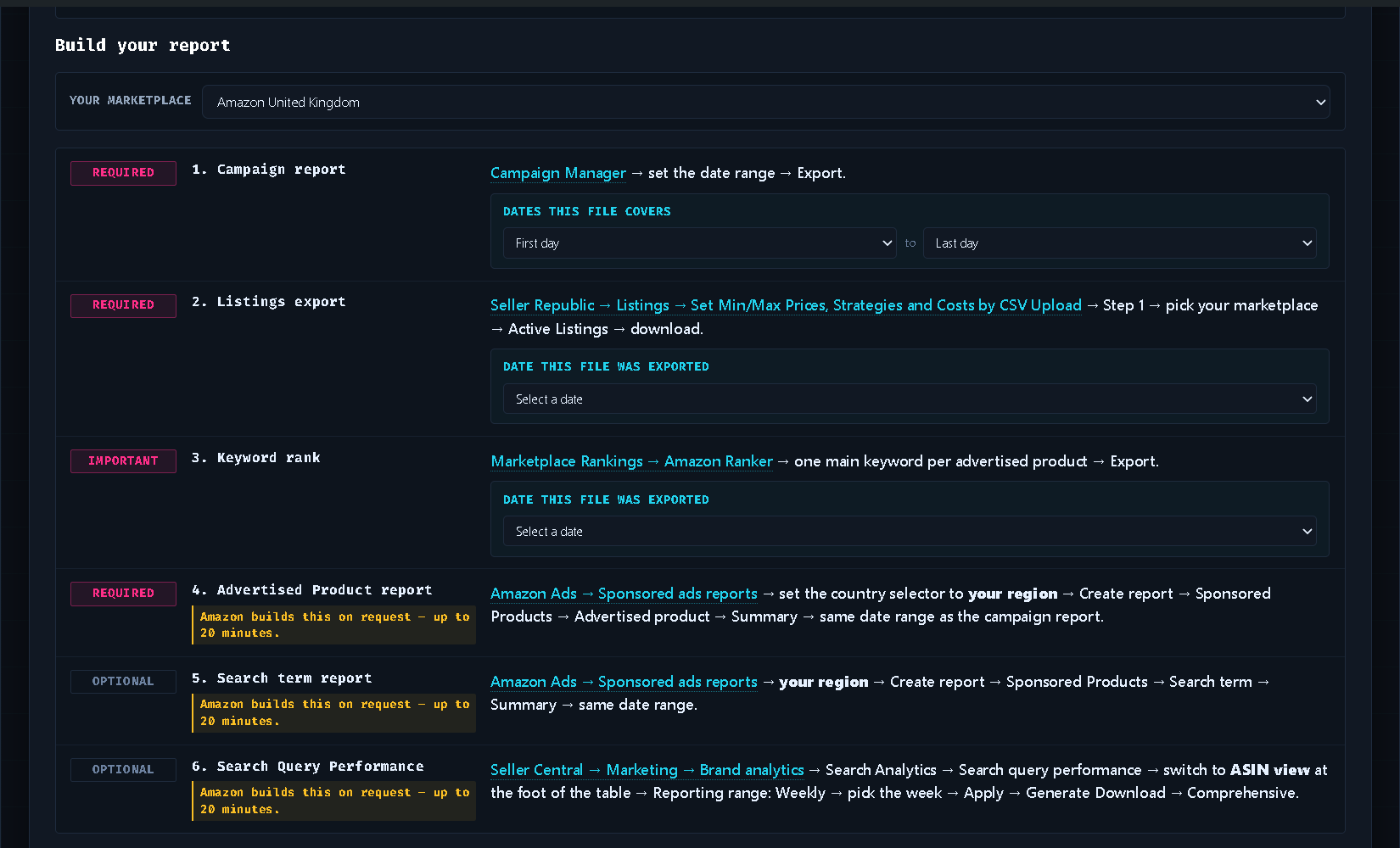
Three files are required and three add depth. Upload them together, CSV or Excel, in any order. Each file is recognised by its columns, not its name.
- Campaign report (required, instant). Amazon Ads → Campaign Manager → set the date range → Export. Spend, clicks and sales for every campaign.
- Listings export (required, instant). Seller Republic → Listings → download your active listings as CSV. Product cost, fees, price, stock and sales for every SKU.
- Advertised Product report (required, up to 20 minutes). Amazon Ads → Sponsored ads reports → Sponsored Products → Advertised product. The only Amazon report that names the ASIN behind each campaign.
- Keyword rank export (recommended, instant). From the Marketplace Rank Tracker, included in the same membership. Stops a listing problem being mistaken for a bid problem.
- Search term report (optional, up to 20 minutes). Amazon Ads → Sponsored ads reports → Sponsored Products → Search term. Flags wasted ad spend: search terms taking clicks with no orders.
- Search Query Performance (optional, up to 20 minutes). Seller Central → Brand Analytics → Search Query Performance → ASIN view. Your price and conversion against the market.
How it works: three steps
- Export. Download your reports from Amazon Ads and your listings from Seller Republic. Request the Advertised Product report first, because Amazon takes up to 20 minutes to build it.
- Upload and click. Drop every file in together, say whether you are VAT registered, and click Build report. It is built in seconds and your files are deleted.
- Act. Open Do this and work down the list. Make the changes in Amazon yourself, then run it again next week to see what moved.
Figures you can check, and data that stays yours
- Matched by ASIN, never by guesswork. Campaigns are tied to products by the ASIN in Amazon’s own Advertised Product report, or an ASIN you put in the campaign name. A campaign that cannot be tied to a product is listed separately and never estimated into the split.
- Ad sales at the price they sold for. Units an ad sold are valued at what the customer actually paid, taken from Amazon’s report.
- The tax on your ad spend, counted. If you are not VAT registered, the VAT Amazon charges on advertising is added to your ad cost and to your break-even ROAS.
- It checks your files for you. Date ranges that do not overlap, products with no cost price and campaigns with no product behind them are listed before the figures.
- No connection to your accounts. It never signs in to Amazon Ads, Seller Central or Seller Republic and holds no API keys. It cannot touch a bid, a budget or a price.
- Files read, then deleted. Only the resulting figures are saved, one report per member, and uploading again replaces it.
$10 a month, with every Marketplace Rankings Pro tool
Amazon Ads 1-Click Pro runs on Marketplace Rankings, Seller Republic’s sister site, where it is listed as Amazon Ads AI. One membership covers it and every other Pro tool there.
- 10-day free trial the first time, no credit card needed
- $10 a month at the launch price, usual $50
- No contract. Cancel any time.
- You need a Seller Republic account for your costs and fees. Start a Seller Republic free trial if you do not have one.
Then $10 a month at the launch price, usual $50. No credit card for the trial, no contract, cancel any time.
Questions
Do I need Seller Republic?
Yes. Your product costs, Amazon fees, prices, stock and sales history come from your Seller Republic listings export. Without it there is nothing to cost your ads against.
Does it connect to my Amazon account?
No. You export the files yourself and upload them. It holds no API keys and cannot change a bid, a budget or a price.
Which Amazon marketplaces does it cover?
Any marketplace your Seller Republic account lists on, including Amazon UK, US, Canada, Germany, France, Italy and Spain. 21 Amazon marketplaces are recognised, each reported in its own currency. Export your Amazon reports with the console language set to English, because the files are recognised by their English column headings.
How does it know which sales came from ads?
From Amazon’s own Advertised Product report, which states the units and sales each ad produced for each ASIN. Everything else that product sold in the same period is counted as organic.
What is break-even ROAS?
The ROAS at which the profit on ad-driven sales exactly covers the ad spend. It is one divided by the product’s margin, raised by the advertising tax you cannot reclaim if you are not VAT registered. Above it the ads make money and below it they lose it.
Does it cover Sponsored Brands and Sponsored Display?
Their spend is shown, but Amazon’s reports do not say which product those campaigns sold, so they are listed separately and left out of the ads and organic split.
What happens to the files I upload?
They are read, turned into figures and deleted. Only the resulting figures are saved, and uploading again replaces them.
Find out what your Amazon ads are really worth
Your next export already holds the answer. Upload it, click once, and see the profit on every campaign, split into ads and organic.
Then $10 a month at the launch price, usual $50. No credit card for the trial, no contract, cancel any time.